Take the Quiz

Official product demo
Official demo · Provided by the owner
Watch on YouTube
Task Manager
There’s more to a task than done vs not done.
**You’ve made the call.
Managed by developer
**You’ve made the call. Left the voicemail. Done everything you can for now. So why is your to-do list still telling you that you haven’t done it?**
Nyblit is a task manager built around the reality of getting things done with ADHD: tasks have steps, interruptions, dependencies and delays. An empty checkbox rarely tells the whole story.
Created by an independent developer with ADHD, Nyblit helps you see what you can act on today, keep track of everything else, and recognise the progress you’ve already made.
Every task has a place:
- **Inbox:** Capture a thought before it disappears. Decide what to do with it later. - **Today:** See the tasks you’ve chosen to work on and can actually move forward. - **Blocked:** Keep track of things waiting on someone or something, with the reason attached. - **Later:** Put something aside deliberately. Set a time and it returns to Today automatically. - **Done:** Record what’s finished—including tasks you’ve cancelled or decided you no longer need.
The aim is a daily list you can approach without having to mentally sort your entire life first.
If you recognise the feeling of opening a to-do list, seeing everything at once and immediately wanting to close it, Nyblit was designed with that moment in mind. Separating actionable work from things that are waiting or postponed gives you fewer competing demands to consider.
It also gives you somewhere to put the details you might otherwise keep rehearsing in your head. Why did this stop? Who am I waiting for? Where had I got to? The task keeps its context, making it easier to pick up again.
**Make the next step easier to see.**
A task such as “sort out the car” can feel enormous when you haven’t decided where to begin. Nyblit’s custom workflows let you define the stages of familiar tasks and reuse them.
A phone call, for example, might involve preparing your notes, making the call and recording what was agreed. If nobody answers, selecting “Left voicemail” moves the task to Blocked. Your progress stays with it.
That means fewer decisions to reconstruct each time you return to a task. You can see where you are and what comes next.
**Give yourself credit before the final checkbox.**
You can spend a busy morning moving things forward without finishing everything. Nyblit makes room for that reality. Completed steps, progress rings and daily activity statistics help make your effort visible.
Subtasks help you break work into smaller actions. Time estimates help you think about what will fit into your day. Repeating tasks support regular responsibilities, while notes and links keep useful information close to the work. Shared tasks and projects let you coordinate with family or colleagues.
**Built from lived experience.**
Nyblit was created by David Margolis, a professional watch restorer and self-taught developer in West London who has ADHD, autism and dyslexia. Its origins go back more than twenty years, to a tool he built to organise his own work.
On a watchmaker’s bench, a repair might be ready to start, waiting for a component or awaiting a customer’s approval. Those differences matter. David brought that same understanding to everyday tasks, creating a system around the difficulties he experienced with traditional organisation.
Nyblit is available on iPhone, iPad, Mac and Apple Watch, with iCloud sync and no separate account to create. Capture tasks on the go, organise them on a larger screen, or check your next action from your wrist. It's also compatible with reMarkable e-ink readers and there is a live public beta for our web available now.
**A task can be unfinished and still be exactly where it needs to be. Nyblit helps you see the difference—and find your next step.**
Anyone that struggles with task management and is overwhelmed by their to-do list. Particularly those with ADHD.
Built by a developer with ADHD, Nyblit gives every task a clear state: actionable, blocked, postponed or done. It keeps today focused on what you can actually do, remembers where you left off and makes progress visible—even before a task is finished.
Nyblit takes privacy seriously. You can run Nyblit on your own iCloud account with no signup needed. Or you can use Nyblit Cloud which adopts industry standard security with encryption in transit and at rest. Our privacy policy is available at https://www.nyblit.app/privacy-policy.
Free and Paid Plans
Pricing has not been verified by our editors.
Check current pricing on Nyblit’s websiteGB storefront
4.9out of 5
10 ratings
Checked
US storefront
4.8out of 5
18 ratings
Checked
Official demo · Provided by the owner
Watch on YouTube
Visual Kanban boards for flexible project and task management
Trello is a visual work management app built around boards, lists and cards. A board represents a project or area of work, lists organize its stages or categories, and cards hold individual tasks or ideas. Moving a card between lists makes progress visible without requiring a complicated reporting system. A simple board could have To do, In progress and Done lists. For a household project, each card might represent a repair or purchase, with enough detail inside to explain the next action. For a team, the same structure can make handoffs easier to understand because everyone can see where the work sits. The list names are flexible: a board can reflect a process, a set of topics or a collection you want to organize. Cards can hold supporting information rather than just a title, and the board's menu provides access to settings, permissions, activity and additional tools. Trello also offers integrations, automation and newer Inbox and Planner workflows. These are options for extending the basic board, with availability and limits depending on the current plan. It is sensible to get the board working before adding automation. The visual approach may suit people who need an external picture of progress, especially when a plain list makes every task look equally urgent. Its limitations become clearer as a board grows: a large number of cards or columns can be difficult to scan, and moving cards is only useful if the information stays current. Keep the active board focused, review stalled work and use clear card titles. Trello is a practical starting point for visible workflows, while projects needing extensive dependency or capacity planning may require more structure.
Helps with
Suggested by Nyblit’s team · not an editorial recommendation
Flexible task manager with AI prioritization and quick capture
Todoist is a task manager for collecting commitments, organizing them into projects and deciding what needs attention next. It can hold personal errands, study work and shared responsibilities in one system, with an Inbox for ideas that do not yet belong to a project. Tasks can have dates, priorities and smaller steps, while projects can be divided into sections and shown as lists or boards. A practical starting point is to create one project for a current responsibility and write down its next actions. For a presentation, that might mean collecting sources, outlining slides and sending a draft for feedback. Subtasks make those actions easier to see without turning the main list into a wall of detail. Natural-language date entry lets you include a schedule in the task name, and recurring dates suit repeat commitments such as preparing a weekly update. Today and Upcoming bring scheduled work together across projects. Labels, filters and priority levels offer additional ways to narrow attention when the collection grows. The calendar layout is available on paid Pro and Business plans, so it is worth checking the current plan comparison if visual scheduling is central to your workflow. Todoist's flexibility is useful when a basic checklist feels limiting, but it still needs regular decisions about what to keep, schedule or remove. A long overdue list can become difficult to scan if every idea receives a date. Start with a few projects, add only the organization you use, and make time to review the Inbox. For people who benefit from seeing an explicit next action, it can provide a practical external record without requiring a fully designed workspace.
Helps with
Suggested by Nyblit’s team · not an editorial recommendation
Elegant GTD task manager for Apple ecosystem
Things 3 is a personal task manager for Apple's devices that separates everyday planning from the larger collection of commitments you want to keep track of. Tasks can belong to projects and areas, with notes, tags, checklists, scheduling and deadlines available when needed. Its predefined lists provide a ready-made structure instead of asking you to design a workspace from scratch. A practical routine starts by capturing incoming tasks in the Inbox. Later, decide whether each item belongs in a project, should be scheduled for a particular day or can wait in Someday. Today becomes a smaller working selection, while Upcoming shows scheduled tasks and calendar events together. This Evening can separate after-work responsibilities from the rest of today's plan. For a larger goal, project headings and checklists can expose the next steps without turning every minor action into a separate project. A packing task might contain a checklist, while organizing a move might warrant several project headings. Quick Find, natural-language date entry and Apple integrations provide faster ways to capture or locate work once the structure is familiar. Things may fit someone who wants a polished personal system and already uses compatible Apple devices. It is worth checking device availability and purchase arrangements before committing to it across a mixed-device setup. Its organization also works best when you distinguish a day you hope to work on something from a genuine deadline. Keep Today realistic, revisit deferred projects and avoid assigning dates to every passing idea. The app supplies a useful framework, but regular review is what keeps that framework current.
Helps with
Suggested by Nyblit’s team · not an editorial recommendation
Your daily routines, visible right when you need them
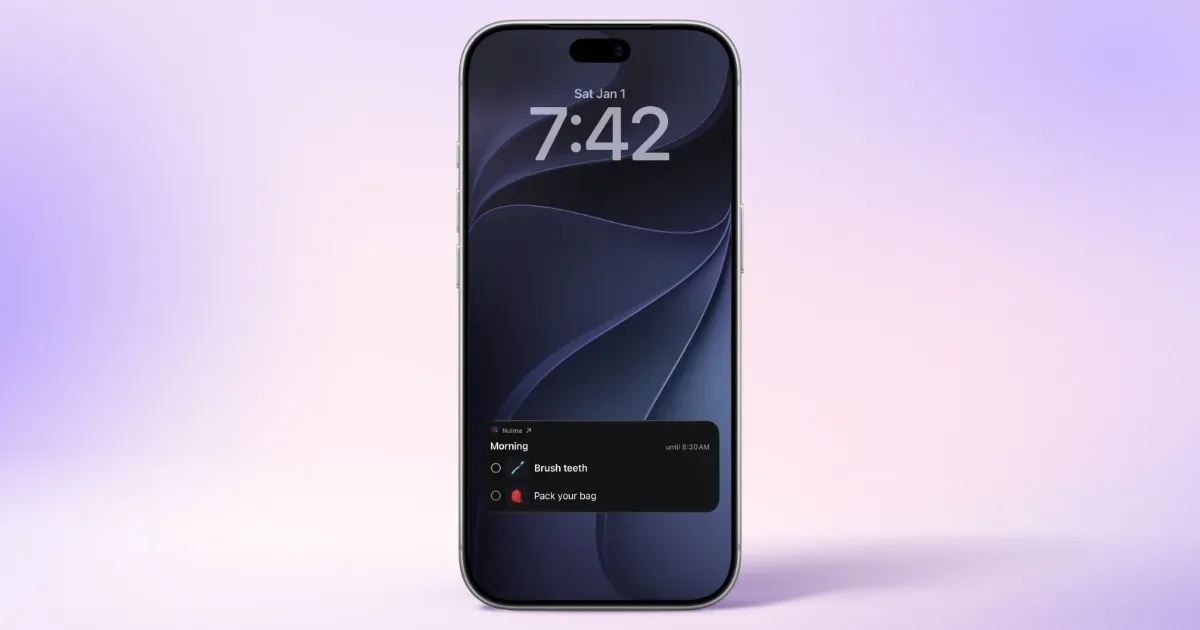
Your day is full, your head doesn't have to be. Nulma turns the parts of everyday life that keep coming back into simple routines. When it's time, the right steps are ready. See what matters now, what comes next, and move through your day one step at a time. MADE FOR REAL LIFE • Build routines for mornings, getting out the door, work, school, evenings, and more. • Break each routine into easy-to-follow steps, with optional symbols to make them clearer. • Choose the days and times that work for you. With Premium, you can schedule the same routine more than once a day. • See your current and upcoming routines without digging through a long to-do list. • Get notified when a routine begins, so you know when it's time to get started. • Check off steps from Live Activities, Home Screen widgets, or Apple Watch. Keep an eye on what's next with Lock Screen widgets and your Apple Watch face. • Bring scheduled Apple Reminders into your routines and complete them alongside your steps with Premium. • Ask Siri what's next or open a routine with a shortcut. STRUCTURE WITHOUT THE PRESSURE Nulma is for busy parents, students, professionals, people with ADHD, and anyone with a lot on their mind. Some days go according to plan. Others don't. Skip a step when plans change and pick things up again when you're ready. No streaks to protect. No pressure to do everything perfectly. Just a little more structure when you need it. PRIVATE BY DESIGN Your routines are personal. They should stay that way. Nulma stores your routines on your device and can sync them securely through your private iCloud account. Your routine content isn't sent to us, and we can't access it. No account to create. No ads. No tracking across apps. Just your routines, kept where they belong: with you. START SIMPLE Get started for free with up to three active routines. Upgrade to Premium for unlimited routines, more flexible scheduling, and Apple Reminders integration. Less to remember. More room to focus.
Helps with