Take the Quiz

Writing clarity tool that highlights what to cut and simplify
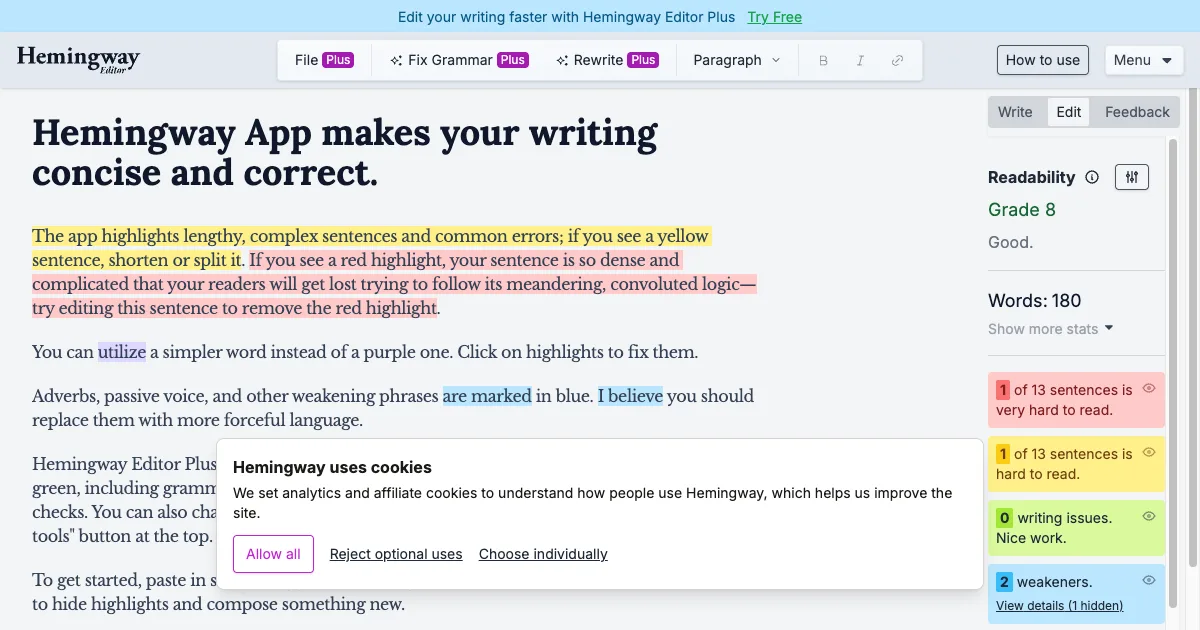
Hemingway Editor is a writing and revision tool that makes potential readability problems visible. Paste in a draft or compose in the editor, then inspect highlighted sentences and phrases. It is especially useful for a focused editing pass on an article, email, web page or report after you have worked out what you want to say. The familiar yellow and red highlights point to sentences that may be hard to read. Other highlights draw attention to passive constructions, adverbs, qualifiers and words with simpler alternatives. A readability score and document statistics provide additional signals, but they are guides rather than a verdict on the quality of your writing. A longer sentence can be appropriate, and a low grade-level score does not mean the ideas are simplistic. A practical approach is to review one paragraph at a time. Split a sentence when it contains too many separate ideas, remove an unnecessary qualifier, and read the revised paragraph aloud to check its rhythm and meaning. You do not need to clear every highlight. Hemingway's own guidance recognizes that writers can deliberately break rules when the result serves the text. The product family includes the browser editor, Hemingway Editor Plus and the Classic desktop app. Plus adds grammar checks and AI-assisted rewrites, tone adjustments and other editing tools; some AI actions use sentence credits. Classic is a separate Mac and Windows product with offline editing and export options, and it does not include the newer AI features. Choose the version that matches how you work. Hemingway may suit writers who want concrete revision prompts, but it cannot verify factual accuracy, understand every stylistic intention or replace a careful final read.
Helps with