Comparison#household chores#habit tracking

    ADHD and missed chores: compare game rewards and habit check-ins

    Use one clearly defined household task to decide which completion record you want to keep.

    ADHD Product DirectoryNovember 6, 20263 min read
    A spray bottle and a blue sponge rest on a gray surface.

    The bin needs emptying again, but you cannot remember whether you did it yesterday. If ADHD makes repeated chores hard to follow, start by deciding what you want to record: the action you finished, or the habit you planned to repeat. Then try one chore in one tracker before adding a whole home checklist.

    This comparison uses two clear criteria: what happens when you mark work done, and how you want to handle a missed day. It does not rank the apps for ADHD or claim that a tracker will make chores happen.

    Start with a chore you can define

    Write a task such as “put the kitchen rubbish in the outside bin.” Choose a point at which it counts as done. “Clean the kitchen” could mean several different jobs, so it makes a poor first test.

    Agree on ownership if you share your home. A checked box should mean that one agreed task is done. It should not leave another person guessing which room you cleaned or whether you still need help.

    Compare the feedback you want

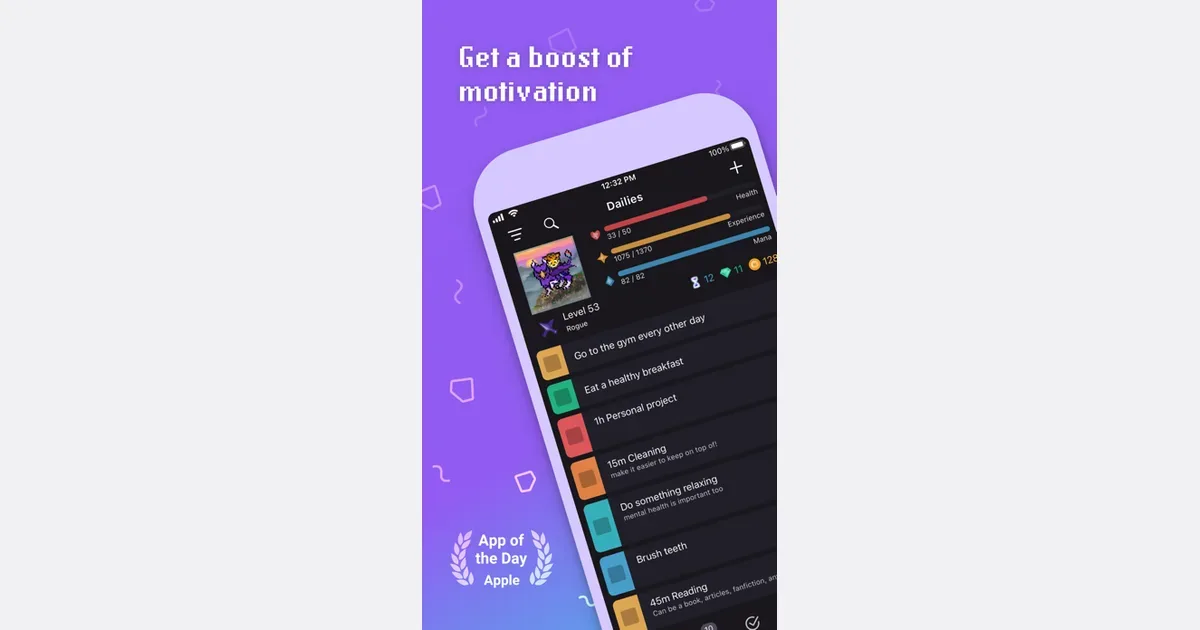
    Habitica rewards completed tasks with Gold, Experience, and items. Its official feature page describes these game rewards. Choose this style if a small game reward sounds appealing; choose something else if managing a character would feel like another chore.
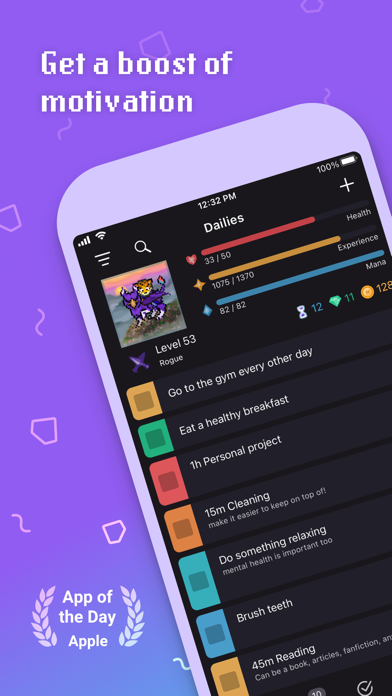
    Habitica screenshot from its directory listing

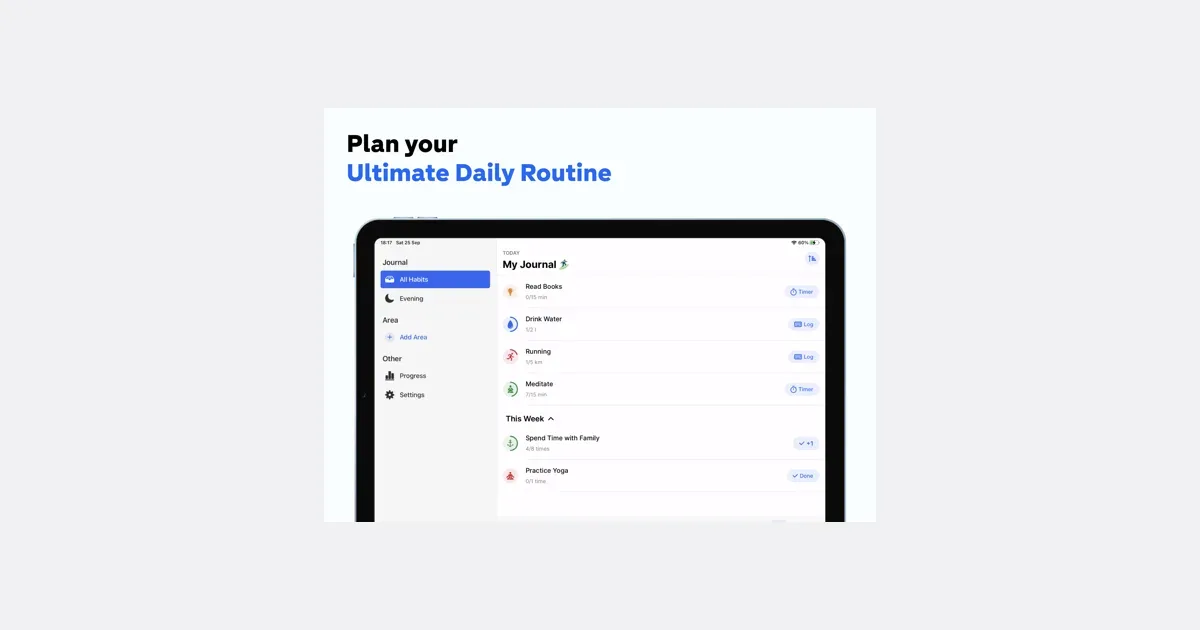
    Habitify offers a Skip check-in option for habits. Its check-in guide explains those labels. Consider this style if you want to record whether you did a repeated chore, with a choice for taking a day off. Choose a tool whose labels you are comfortable seeing.

    Get monthly app discoveries and focus tips

    Habitify screenshot from its directory listing

    Question Habitica Habitify
    What feedback does the checked action give? Gold, Experience, and items for completed tasks A habit check-in with a Skip choice
    Which trial would show whether it fits? Check off one finished chore and decide whether the game reward matters to you Record one repeated chore and decide whether the status choices match your day
    What should you judge yourself? Whether you want to maintain a game as well as a task list Whether checking a habit feels useful rather than discouraging

    Try three days without building a perfect system

    Use the same small chore each day that it is needed. Check it off just after you finish. If you forget to log it, distinguish a missing record from an undone chore when you review the test.

    After three days, ask one question: did the record help you know what needed doing? If you mostly spent time editing the app, reduce the setup. A paper check mark may suit this job better.

    For a chore that you keep avoiding despite a clear record, use the guide to asking for low-pressure accountability to plan a check-in with someone you trust. That is a separate choice from which completion screen you prefer.

    Choose your next step

    • Pick one chore with a clear finish.
    • Decide whether you want game feedback or a habit status.
    • Keep the setup small enough to update after the chore.
    • Review missing work and missing records separately.

    Today, write one chore in plain words and try recording it after you finish. Keep the tool only if that record is useful to you.

    Apps mentioned in this article

    Habitica logo

    Gamified habit tracker turning life into an RPG adventure

    Habitica is a task and habit tracker that turns everyday actions into a role-playing game. You create an avatar, add responsibilities and receive in-game rewards when you mark real-world work complete. The appeal is making progress visible through character development, equipment and other game elements rather than presenting another plain checklist. The app separates repeatable habits, scheduled Dailies and one-off To-dos. That distinction can help you represent different kinds of commitments honestly: a habit you want to practice more often is not the same as a task with a specific finish point. For example, you could track short reading sessions as a habit, a regular household routine as a Daily and a particular form submission as a To-do. Completing activities earns experience, gold and items. Parties and challenges add a social element, allowing people to share accountability or work through a common set of tasks. The developer also describes reminders, widgets, avatar customization and synchronization across devices. These features can make a routine feel more engaging, especially if you already enjoy games and collecting rewards. The game also includes consequences, such as losing character health when scheduled work is missed. That makes it worth considering how you respond to penalties, streaks and unfinished tasks. They may feel motivating to some people and discouraging to others. Start with a small set of achievable responsibilities and make room for rest rather than translating every part of life into a score. Habitica may suit someone who wants playful structure around routines; a forgiving checklist may be easier if maintaining the game becomes another obligation or if the consequences create pressure.

    Helps with

    BrowserAppleMobile
    Free; $4.99/month (iOS)
    View
    Habitify logo

    Clean, data-driven habit tracker with trend analysis

    Habitify is a habit tracker for turning repeated intentions into a visible routine. You create a habit, choose when it should appear and record progress against a goal. Its daily journal brings those items together, while charts and history help you review what has been happening over a longer period. A habit can represent a simple completion or a measurable amount, such as minutes spent reading. The setup includes a repeat schedule, a target, a logging method and reminders. Time-of-day organization can keep the list focused on what is relevant now rather than showing every intention at once. Start with one or two habits whose completion is easy to recognize, then adjust the schedule after you have used it through an ordinary week. Built-in timers can support duration-based habits, and notes add context when a check mark would leave out something useful. Progress views and streaks make consistency visible. They can be motivating, but the more useful question is often whether the routine still fits your day. A missed entry may mean you forgot to log, rather than that you failed to do the activity. Habitify offers connected tracking and automation alongside manual entries. Supported options include health data and calendar connections, with more advanced automation on paid plans. These can reduce repeated entry for a suitable activity, but availability varies by platform and integration. Check what will be read or changed before connecting another service, and confirm that automatic progress is recording the habit you intended. The free tier supports a limited number of habits, while paid plans expand tracking and tools such as advanced reminders and flexible routines. Review the current plan in your app rather than relying on older video prices. Habitify may suit someone who prefers a structured checklist with measurable progress across devices. Its value depends on choosing a manageable routine and reminders you will notice without finding them overwhelming.

    Helps with

    AppleMobileBrowser
    Free; $2.49/month (billed annually) or $59.99 once
    View