Take the Quiz

A zero-friction notes and productivity app
Helps with
BrowserMobileWindows
Free
Task Manager
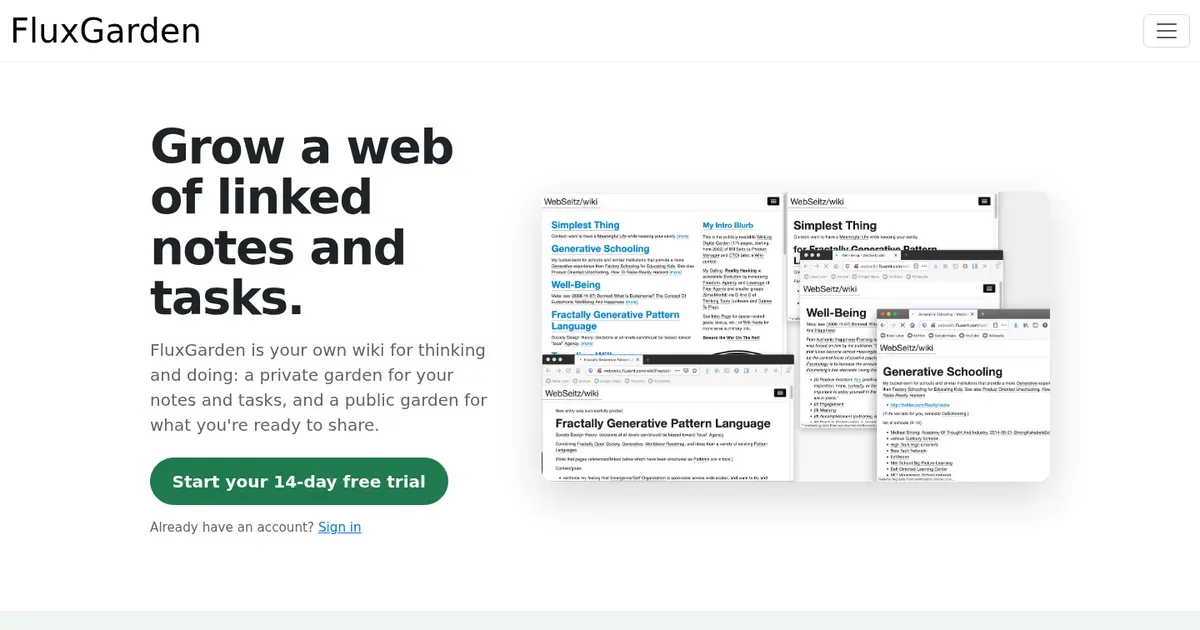
Grow a web of linked notes and tasks.
FluxGarden is your own wiki for thinking and doing: a private garden for your notes and tasks, and a public garden for what you're ready to share.
Managed by developer
FluxGarden is your own wiki for thinking and doing: a private garden for your notes and tasks, and a public garden for what you're ready to share.
Note note is an island. Every note connects to others, and the connections are where the thinking happens.
No idea is ever really finished. You refine it, jump off in a new direction, rediscover it a year later, and refine it again. Your notes tool should make that cheap.
Some ideas belong in public. Most aren't ready yet. Moving a thought from private to public should be a copy-paste, not a format conversion.
You get 2 gardens, under one subdomain you pick (like "alice.flux.garden"):
Now your tasks can be just as linky: Some of your work fits a pretty "project" package. Lots of it doesn't: your bathroom remodel, your band, your health, your Q3 launch. So your tasks live in your inner garden, in the same graph as your notes, nested however deep you need. And then "star" a small set of Most Important Tasks to do Today.
People with messy/ill-structured work, where you discover your next tasks/subtasks as you go along.
Infinite threading/nesting of tasks, but then driving everything from Most Important Tasks tiny subset so you don't get overwhelmed with stress/guilt.
It will become a multi-user app, so data is stored in my psql. It will never be sold, nor used to train AI. There's an Export feature you can run at any time.
Screenshot 1 of 3
Context is kept and close to the details.
You refine it, jump off in a new direction, rediscover it a year later, and refine it again. Organize, then re-organize whenever you need to.
Subscription · $48/yr
Pricing has not been verified by our editors.
Check current pricing on FluxGarden’s website
Calendar-centered task management with keyboard-first workflow
Akiflow is a task and calendar planner built around bringing responsibilities into one inbox and deciding when to work on them. It combines task capture with time blocking, making it possible to see a piece of work alongside meetings rather than leaving it in a separate list. Integrations can collect actions from other tools so they can be considered in one planning routine. A practical workflow begins by reviewing the inbox and clarifying what each item actually requires. A message that says to prepare a proposal might become several actions, each with a realistic duration. You can then plan those actions in available calendar space or reserve a broader project time slot. Drag-and-drop scheduling and natural-language input provide different ways to make those decisions. Akiflow's wider feature set includes calendar connections, project organization and an AI assistant called Aki. Supported integrations include common calendar, email and communication tools, with the exact arrangement depending on your accounts and setup. Review the permissions and the specific import behavior before connecting every source of work at once. The approach may suit people whose tasks are scattered across several services and who want one deliberate place to plan the day. Its value depends on maintaining that planning habit: importing everything without deciding what belongs on today's schedule can simply create a larger inbox. Begin with one or two integrations, use descriptive action titles and leave space for interruptions. Akiflow can make the relationship between a task and available time clearer, while deciding what to decline, postpone or simplify remains a personal or team responsibility.
Helps with
There’s more to a task than done vs not done.
**You’ve made the call. Left the voicemail. Done everything you can for now. So why is your to-do list still telling you that you haven’t done it?** Nyblit is a task manager built around the reality of getting things done with ADHD: tasks have steps, interruptions, dependencies and delays. An empty checkbox rarely tells the whole story. Created by an independent developer with ADHD, Nyblit helps you see what you can act on today, keep track of everything else, and recognise the progress you’ve already made. Every task has a place: - **Inbox:** Capture a thought before it disappears. Decide what to do with it later. - **Today:** See the tasks you’ve chosen to work on and can actually move forward. - **Blocked:** Keep track of things waiting on someone or something, with the reason attached. - **Later:** Put something aside deliberately. Set a time and it returns to Today automatically. - **Done:** Record what’s finished—including tasks you’ve cancelled or decided you no longer need. The aim is a daily list you can approach without having to mentally sort your entire life first. If you recognise the feeling of opening a to-do list, seeing everything at once and immediately wanting to close it, Nyblit was designed with that moment in mind. Separating actionable work from things that are waiting or postponed gives you fewer competing demands to consider. It also gives you somewhere to put the details you might otherwise keep rehearsing in your head. Why did this stop? Who am I waiting for? Where had I got to? The task keeps its context, making it easier to pick up again. **Make the next step easier to see.** A task such as “sort out the car” can feel enormous when you haven’t decided where to begin. Nyblit’s custom workflows let you define the stages of familiar tasks and reuse them. A phone call, for example, might involve preparing your notes, making the call and recording what was agreed. If nobody answers, selecting “Left voicemail” moves the task to Blocked. Your progress stays with it. That means fewer decisions to reconstruct each time you return to a task. You can see where you are and what comes next. **Give yourself credit before the final checkbox.** You can spend a busy morning moving things forward without finishing everything. Nyblit makes room for that reality. Completed steps, progress rings and daily activity statistics help make your effort visible. Subtasks help you break work into smaller actions. Time estimates help you think about what will fit into your day. Repeating tasks support regular responsibilities, while notes and links keep useful information close to the work. Shared tasks and projects let you coordinate with family or colleagues. **Built from lived experience.** Nyblit was created by David Margolis, a professional watch restorer and self-taught developer in West London who has ADHD, autism and dyslexia. Its origins go back more than twenty years, to a tool he built to organise his own work. On a watchmaker’s bench, a repair might be ready to start, waiting for a component or awaiting a customer’s approval. Those differences matter. David brought that same understanding to everyday tasks, creating a system around the difficulties he experienced with traditional organisation. Nyblit is available on iPhone, iPad, Mac and Apple Watch, with iCloud sync and no separate account to create. Capture tasks on the go, organise them on a larger screen, or check your next action from your wrist. It's also compatible with reMarkable e-ink readers and there is a live public beta for our web available now. **A task can be unfinished and still be exactly where it needs to be. Nyblit helps you see the difference—and find your next step.**
Helps with
Flexible project management with multiple viewing options
Asana is a work management platform for organizing projects, tasks and responsibility across a team. It gives work a shared place where people can see what needs to happen, who is handling it and when it is due. Projects can be viewed in several ways, including lists, boards and calendars, with additional planning views and capabilities depending on the plan. A useful starting workflow is to create a project for a specific outcome, divide it into stages and write tasks as concrete next actions. For an event, that could mean booking a venue, reviewing invitations and confirming equipment. Assigning an owner and a date to each action helps distinguish a shared intention from work someone has actually agreed to do. Relevant discussion and updates can stay near the task instead of being scattered through messages. Asana also offers custom fields, forms, rules, reporting and tools for coordinating connected projects. These become more useful when a team has a repeatable process and needs visibility beyond one person's list. Its growing AI features are another part of the offering, so review current availability rather than assuming every capability is included in a basic account. The important consideration is how much coordination your work really needs. Extra fields, notifications and workflows can create administrative effort if nobody agrees how to use them. Begin with a clear project structure and a small set of conventions, then add detail when it answers a real question. Asana may suit collaborative work with handoffs and deadlines; a lightweight personal checklist can be a better fit for a small collection of private errands.
Helps with